Parallel text
Facing pages are sometimes used to present two related texts, for example a translation opposite its original language version. In such cases, each passage runs over only the verso or recto pages.
//floatGroup/parallelTextGroup
Capture each passage within a parallelText element and capture all parallel text elements within a single parallelTextGroup.
Each passage runs over only the verso or recto pages
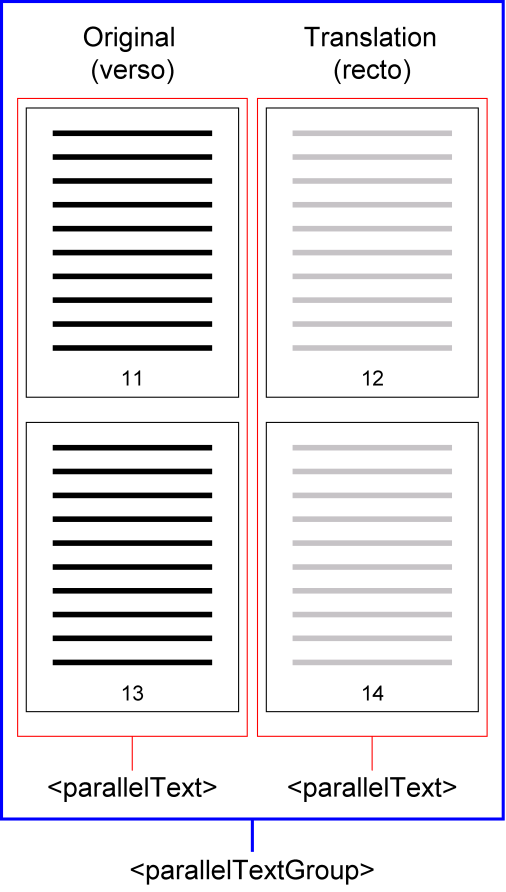
To capture page breaks within parallel text groups, capture each page in a
parallelText group as a segment and indicate the start of each segment
using a processing instruction in the form <?segment id="segmentNN"?>
where NN is a sequential number.
Example using processing instructions for segments
      <parallelTextGroup id="oso-9780198269953-chapter-1-parallelTextGroup-1">
        <parallelText id="oso-9780198269953-chapter-1-parallelText-1" doi="10.1093/oso/9780198269953.003.0001.009.0001"><textMatter>
 <div1>
   <p>
     <?segment id="segment01"?> ... translation text from page 11
     <?segment id="segment02"?> ... translation text from page 13 </p>
 </div1></textMatter>
        </parallelText>
        <parallelText id="oso-9780198269953-chapter-1-parallelText-2" doi="10.1093/oso/9780198269953.003.0001.009.0002"><textMatter>
 <div1>
   <p>
     <?segment id="segment01"?> ... original language text from page 12
     <?segment id="segment02"?> ... original language text from page 14 </p>
 </div1></textMatter>
        </parallelText>
      </parallelTextGroup>